Skip to contentServetta

Every feature in Servetta.

Take bookings, plan your evening and bring guests back. Thirteen features come with the subscription. Voice AI is a separate add-on.

Today · Thursday48 / 60 covers · 3 waiting
19:00Bakker · 4p · T4Seated
19:42De Groot · 2p · T7+18 min
20:00Terpstra · 4p · nuts→ T9
20:04Waiting list · Öztürk 2pT4 coming free

Bookings & service

Reservations

Guests book through the button on your site or your booking link on Instagram, your Google profile or a QR code you make yourself. You add phone bookings and walk-ins yourself, or Voice AI picks up. Everything ends up in one place. Servetta works out what is still available per quarter hour.

Guests book themselves, without an account
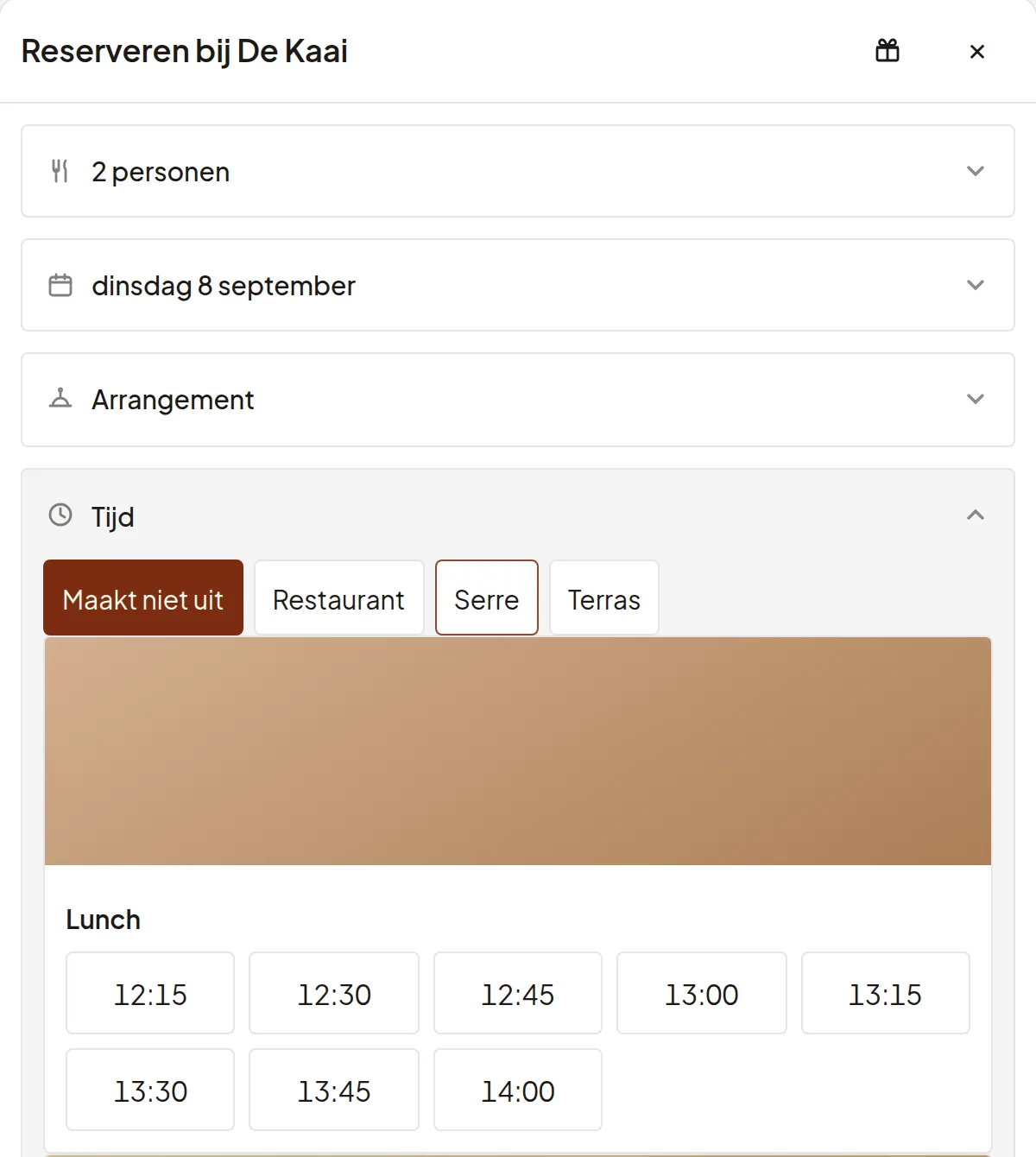
The demo restaurant's booking widget: two people, Tuesday 8 September, a choice of restaurant, conservatory or terrace, and the free lunch times.

Timeline and planning

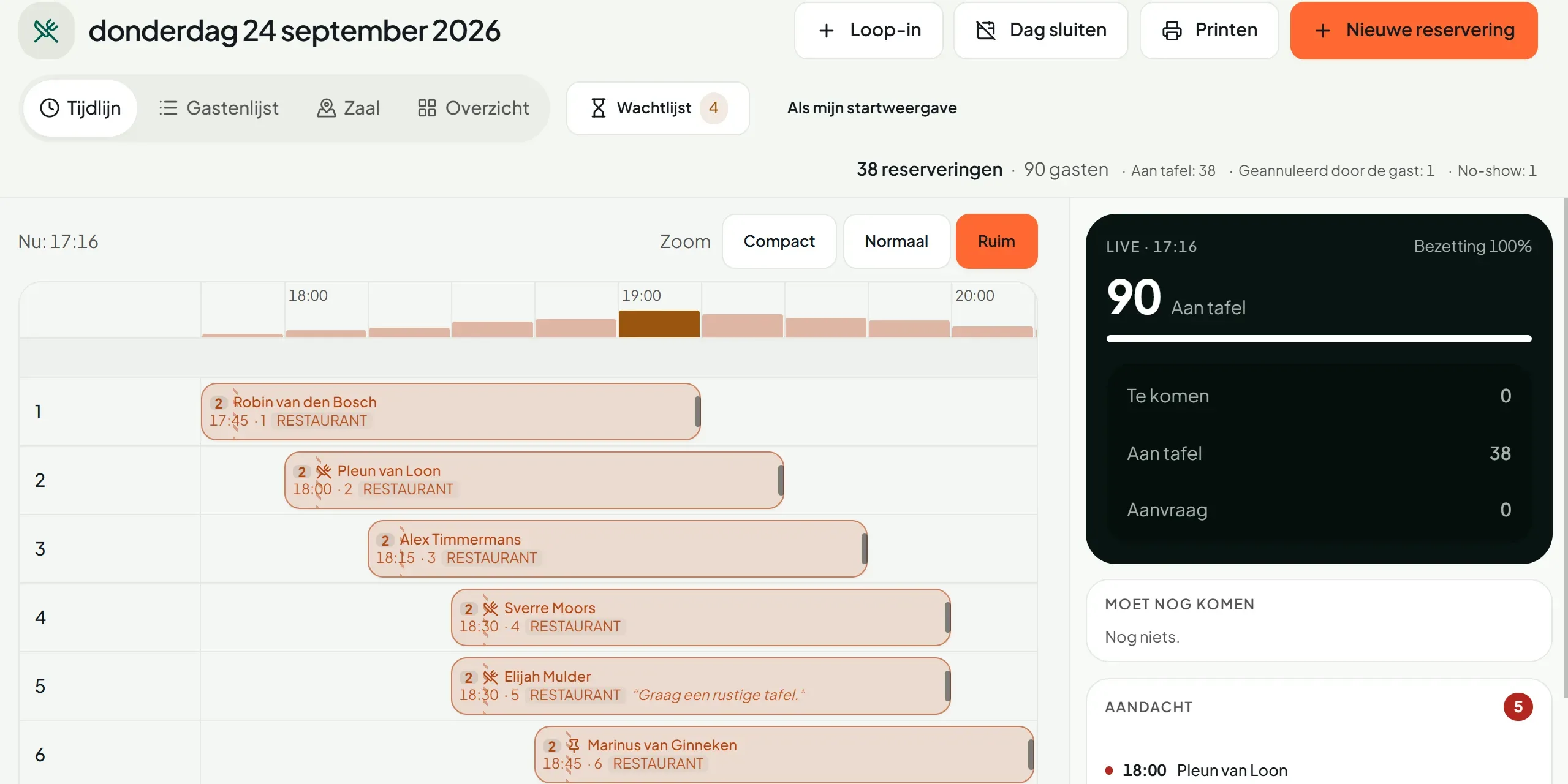
Every table is a bar and every booking a block. You see overruns, gaps and double bookings before they become a problem. Drag a booking and the timeline is right again.

You spot overruns in time

The service overview for Thursday 24 September: a timeline with a row per table and, on the right, 90 guests seated.

Floor plan and tables

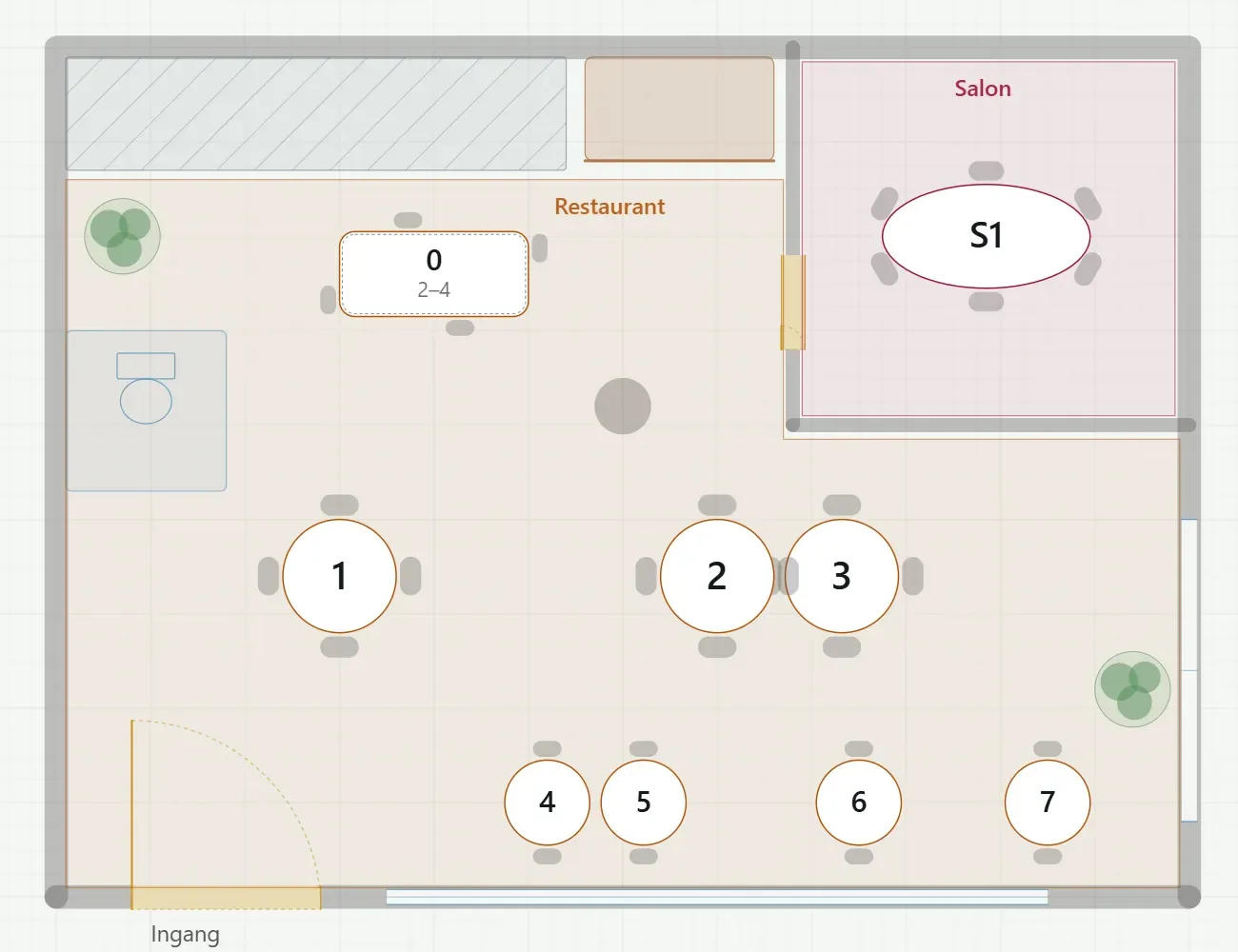
You draw your own room and terrace, join tables for large groups and save a layout for each season. What is on the floor plan is on the timeline too.

Moving is allowed, double booking is not

The demo restaurant's floor plan: the restaurant with numbered tables and a separate salon.

Waiting list

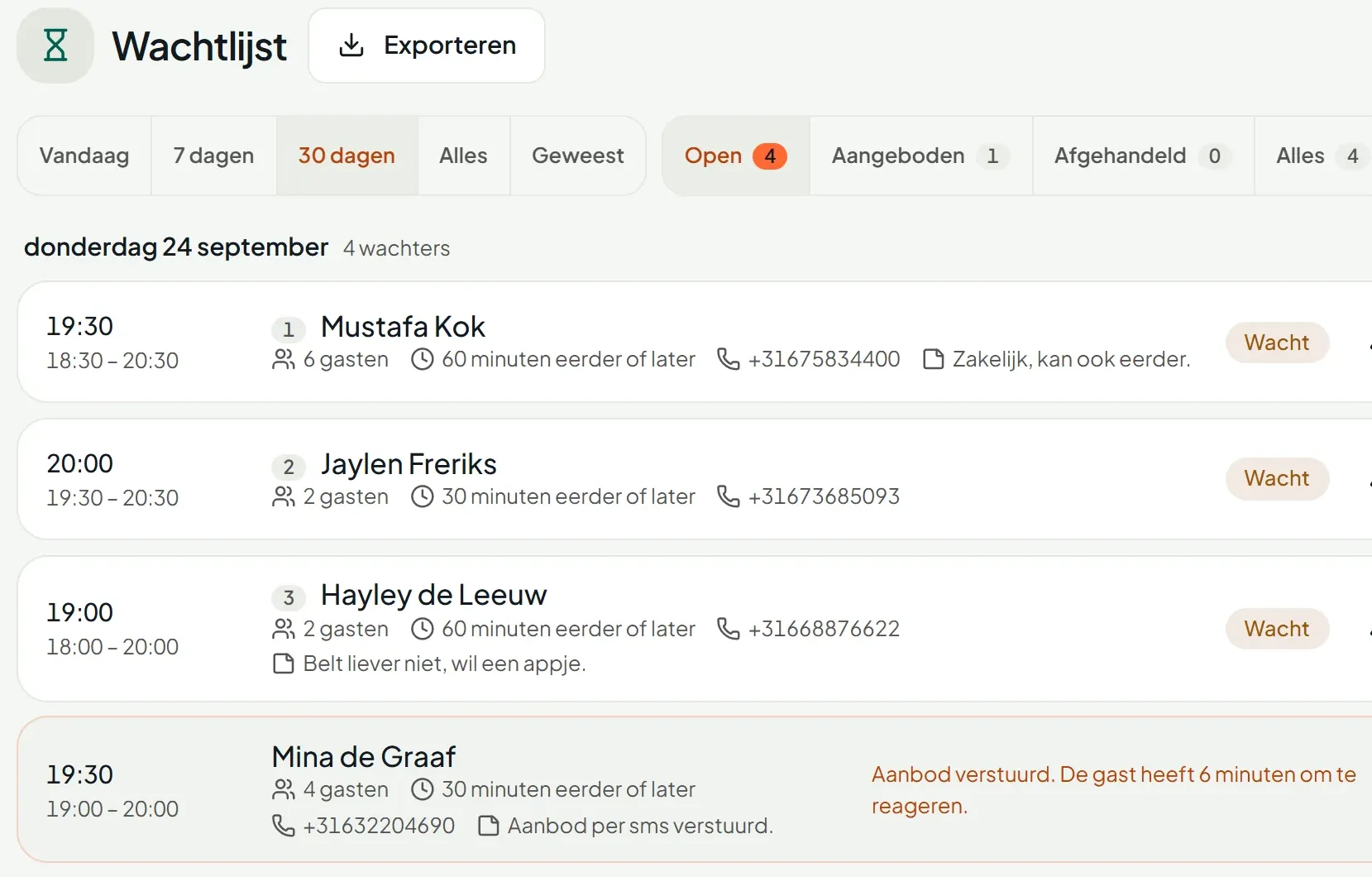
When a table comes free, you see who on the waiting list fits it. That guest gets an email with a link that is valid for twenty minutes. It goes out after your click, or automatically if you switch that on. You add walk-ins in a few taps.

A table that frees up goes first to whoever is waiting

The waiting list for Thursday 24 September: four guests with their preferred time, party size and phone number.

Guests & messages

Guest profiles

The profile keeps track of visits, allergies, preferences and notes by itself. All of it shows on every new booking. You can merge duplicate profiles.

Your guest data is yours, export in one click

Messages to your guests

Your guest automatically gets a confirmation, a reminder and a message asking if they are still coming. They arrive in the guest’s own language and in your words. Reminders and waiting-list messages can also go by text. We charge those per message. For every message you see if it was delivered, opened and clicked.

You see if every message arrived

Automatic messages and suggestions

Six messages go out by themselves once you switch them on: welcome back, birthday, we miss you, after a cancellation, for a new regular and after feedback. If an evening looks set to stay quiet, you get a nudge with an email ready to send.

Nothing goes live until you press Activate

Feedback and reviews

Every guest who actually sat down gets a short question the next day: stars, whether they would recommend you and room for a comment. A low score is set aside so you can follow it up. You reply by email. The best reviews go on your own page, with your reply.

You read the critical review first

Revenue

Deposits and no-shows

Ask for a deposit where a no-show hurts: per shift, per weekday or from a party size you set. The guest pays with iDEAL while booking and the money goes to your own Mollie account. Guests change or cancel through the link themselves.

€0 transaction fee from us on a deposit

Deposit · Saturday, parties of 6+

Prepaid

€0
18:15Postma· 9p
Waiting for iDEAL
19:30Bakker· 4p
Not needed
20:00Van Es· 9p
Waiting for iDEAL
€0transaction fees from us

Webshop, gift cards and experiences

You get your own webshop for gift cards and for packages the guest collects on a day they choose. You also sell gift cards through your widget. The guest books an experience, such as a Christmas menu or a chef’s table, straight away with the reservation. You redeem a gift card at the table, in full or in part, and you always see the balance.

Revenue before the guest walks in

  • Vivid
  • Bistro
  • Elegant
  • Calm

Campaigns and newsletters

Segments fill themselves and you design the newsletter by dragging, in your own house style. Send a test email, schedule it and see who opened it, clicked and then booked.

Your email reaches exactly the guests you choose

Management & AI

Reporting

You see covers, bookings, no-shows, cancellations and where your guests come from. Pick a period and Servetta puts the period before it alongside.

Every figure beside the period before

Users and permissions

Everyone gets their own login and extra users cost nothing. Owner, manager, host and Saturday hire each get their own rights, per venue too. Invitations go by email.

Unlimited users, no surcharge

Voice AI on the phoneAdd-on

A digital assistant picks up. You choose when: always, when nobody answers or outside opening hours. It books, changes and cancels in the same diary as your widget and puts guests on the waiting list when you are full. It answers questions about your restaurant and transfers the call when the caller asks for a member of staff. You can read every call back in Servetta.

The phone gets answered, at 20:14 too

  1. Guest"Good evening, do you have room for four on Saturday?"
  2. UnderstoodSaturday 13 September · 4 people · evening
  3. CheckedThe same availability as your widget: 19:30 or 21:00 free for four.
  4. Servetta"Saturday at half seven or at nine, which suits you better?"
  5. In Servetta19:30 · Terpstra · 4p · Saturday · confirmation sent

Everything that is included.

There is no more expensive version and no “from” price. All of this is included, for one price per restaurant. Only Voice AI is an add-on.

Bookings

  • Widget on your site: a floating button, a box in your page or your own button
  • Your own booking page, and links with the date, time or party size already in them
  • A calendar that shows, day by day, where there is still room
  • Dutch and English, plus German, French and Spanish if you want them
  • A choice of dining room or terrace, and experiences while booking
  • Booking on request, and a separate request for large groups
  • Waiting list from the widget when you are full
  • The guest changes, moves or cancels through the link themselves
  • Shifts, a maximum number of guests per quarter hour and per area, and exception days
  • For every time slot, an explanation of why it can or cannot be booked

During service

  • Service overview with timeline, guest list, floor plan and day sheet
  • Automatic table assignment, joined tables included
  • Move bookings by dragging, with no double bookings
  • Walk-ins in a few taps
  • Per quarter hour: who is arriving and how many are seated
  • Floor plan editor with zones, decor, templates and seasonal layouts
  • Print the day sheet or save it as a PDF
  • An app on the home screen of your iPad and phone, with push notifications

Guests and marketing

  • Guest profiles with allergies, preferences, tags and visit history
  • A no-show counter, and a label when it happens again
  • Feedback after every visit, with follow-up on low scores
  • Reviews shown on your own page, with your reply beside them
  • Newsletters with a drag-and-drop editor, segments and statistics
  • Six automatic messages, such as birthday and welcome back
  • See which email led to a booking
  • Export your guest list in one click

Payments and sales

  • A deposit or full prepayment, set per rule
  • Payments through your own Mollie account, with no transaction fee from us
  • Refunds from the booking
  • Top-up payments when the party grows
  • Sell and redeem gift cards, in part too
  • Webshop for packages, collected on a day the guest picks
  • Experiences and tickets with their own capacity

Team and organisation

  • Unlimited users, with five roles
  • Rights per member of staff and per venue
  • Multiple venues under one login
  • Reporting on how guests booked, beside the period before
  • Export of bookings, guests and the waiting list
  • Message centre with the delivery status of every message
  • Your team works in Dutch, English, German or Spanish
  • Help centre and support inside the app

Voice AI · add-on

  • Picks up: always, when nobody answers or outside opening hours
  • Books, changes and cancels
  • Answers questions with what you have recorded about your restaurant
  • Waiting list, call-back requests and group requests
  • Transfers to your own number
  • Every call and its outcome, to read back later

€49

a month, with everything above included.

Excluding VAT, per restaurant. Each additional restaurant costs €39 a month. Voice AI costs €79 a month plus call costs.

  • No credit card
  • The trial ends by itself
  • Cancel monthly on monthly billing

Try Servettain your own restaurant.

You do not need a credit card. Unless you say yes, the trial ends by itself.

30 days free